Auto rotate photosEvery photo upright, automatically
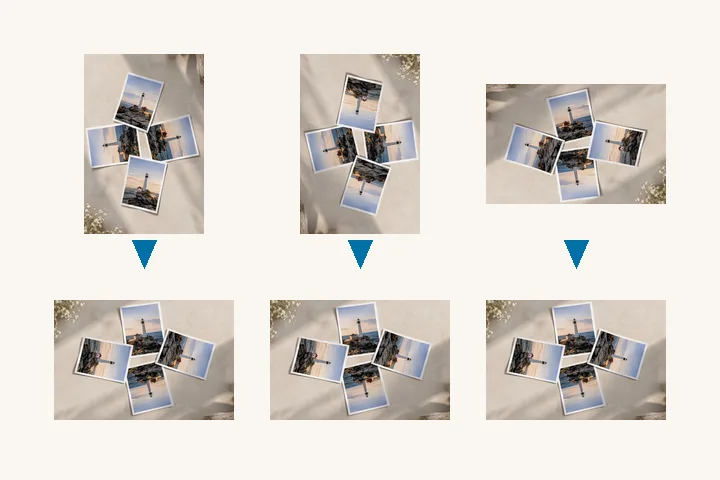
Drop your photos and each one turns itself the right way up.
or drop it here — pasting works too
Choose as many as you like. Every tag is read here, in this tab, and nothing is queued anywhere else.
— sub-folders are kept as folders inside the ZIP.
No photo handy?
FreeNo sign-upPhotos stay on your device
Every file is turned upright by its own orientation tag; scans with no tag get a suggestion read from their text, which you confirm.
The table of files, the tag each one arrived with and the distance each array travelled appears here. Nothing is uploaded to produce it.
Upright from the tag first
A phone does not turn the pixels when you hold it sideways. It stores the picture the way the sensor saw it and writes one number — the orientation tag — saying how to turn it for display. Everything that reads the tag shows the photo upright; everything that ignores it shows it on its side. Auto-rotating a folder means applying each file’s own tag to its pixels and writing the tag back as 1, so the two kinds of program finally agree. A folder from a phone usually holds several different tags; each file is turned by its own.
Scans with no tag
A scanner, a screenshot or an app that re-saved the file often leaves no tag at all, and then nothing in the file says which way up it is. For pages of writing there is still evidence: rows of text run across an upright page, and in most scripts the letters are not symmetric top to bottom — Latin letters rise above the line more often than they drop below it, and Devanagari letters hang from a headline along the top. Suggest upright measures that on each untagged file and proposes a quarter turn with the share of lines that agree. Nothing is applied until you tick it.
- Files are worked one at a time, so only one full-size picture is in memory at once.
- Each written file is read back — its tag and its decoded size — before the row says Verified.
- The ZIP keeps sub-folders when you choose a whole folder, and carries a manifest.csv.
For one photo at a time, fix orientation reads the tag in words and offers both repairs. For a folder with a turn of your own choosing, use batch rotate.
Questions about this page
How does it know which way up a photo is?
For a phone or camera photo it reads the orientation tag the camera wrote — the record of how the phone was held. That tag is the reason the photo looks right on the phone and sideways elsewhere; baking it into the pixels makes every program agree.
What about files with no tag?
A screenshot or a scan usually has none. For a scanned page, Suggest upright reads the rows of text — which way they run, and whether the letters rise above the line or hang from a headline — and proposes a quarter turn, ticked only when most lines agree. A photograph of a scene gets no suggestion, and nothing is turned without a tick.
Is this AI?
No. Both steps are plain measurement: a 16-bit tag read from the file, and counts of ink along the rows of a page. They run on this device and give the same answer every time. An on-device model that suggests an upright for photographs of scenes is not part of this version.
Does it re-encode my JPEGs?
Not where it can avoid it. The default route moves a JPEG's compressed blocks instead of decoding them, and the row says lossless only after the written file is compared with the original. Files whose size would need an edge trimmed are baked instead, and the row says so.



Auto Rotate