Correct perspective in a photoMake a slanted page square
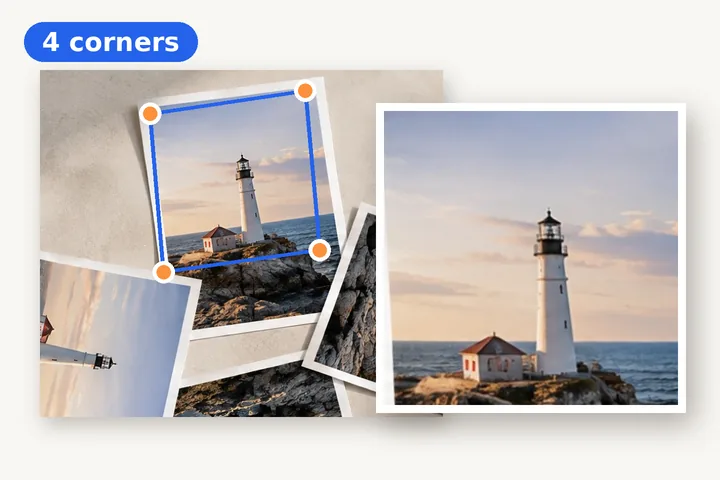
Put four dots on the corners. Get a straight page back.
or drop it here — pasting works too
A photo of a document, a card, a screen or a building front taken at an angle.
No photo handy?
FreeNo sign-upPhotos stay on your device
Drag four corners onto a page, a card, a screen or a building front, and get back a straight rectangle — sized from your corners or to A4, Letter or ID-card proportions.
When a turn is not enough
A photo of a receipt, a form or a whiteboard is rarely taken straight down. The edge nearest the phone comes out longer than the far one, and the sides lean in. Rotating that picture only moves the lean around. What it needs is a projective correction: the four corners of the page are mapped onto the four corners of a rectangle, and every pixel in between follows. That is a single 3 × 3 matrix — a homography — worked out from your four dots, applied once to the original pixels.
How to get a clean result
- Put each dot on the paper's own corner, not on its shadow. Zoom the page in your browser if a corner is hard to hit; arrow keys move a focused dot one pixel at a time, Shift ten.
- Choose A4 or Letter when you know the paper size: a page photographed at a steep angle can measure a little short, and the paper shape puts it right.
- For an ID card, choose ID card: 85.6 × 53.98 mm, the size of almost every bank and identity card.
- If the page is also rotated a quarter turn, correct the perspective first, then turn the result on the main page.
A scan from a flatbed that is only a few degrees crooked does not need four corners: straighten a scanned document measures the skew from the lines of text. A tilted horizon belongs on straighten a photo, and a picture you want to tilt in space on purpose is the 3D rotate page.
Questions about this page
How is this different from straightening?
Straightening turns the whole picture by an angle, which fixes a tilted horizon. A page photographed from one side is not tilted — it is a trapezium, wider at the near edge than the far one. No rotation can make that a rectangle. Perspective correction maps the four corners you place onto the four corners of a rectangle, so every edge comes out straight and square.
Can it find the corners by itself?
It can suggest them: Find the corners for me looks for the largest region that stands out clearly from the picture's border — a white page on a dark desk is the easy case — and puts a dot on each of its four extreme points. It is only applied when you press it, and you should check each dot. On a busy background, place them yourself.
What size does the result come out?
By default the width is the average of the top and bottom edges you marked and the height is the average of the two sides, in the photo's own pixels. Choose A4, Letter or ID card and the long side is kept while the short side is set to that shape. The size is shown before you save.
Why is the far edge softer than the near one?
The far edge of the page covered fewer of the camera's pixels than the near edge. Correction stretches it back to full size, and stretching cannot add detail the camera never recorded. Shoot as square-on as you can and correction has less to make up.
Is my photo uploaded?
No. The corners, the preview and the full-size result are all computed in this tab — the full-size pass in a background worker so the page stays responsive. The file is written straight to your downloads.

Perspective Correction